
User's Manual Part 20
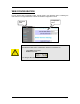
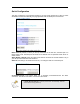




Table Of Contents
- INTRODUCTION
- GETTING STARTED
- WEB CONFIGURATION
- PC CONFIGURATION
- FACTORY RESET

WEB CONFIGURATION
In every Router Web Configuration page, the left panel is the navigation menu containing the
main sections. The right-side frame is where the detailed configuration is done.
Configuration
panel
Navigation
panel
Remember that after every configuration change, it is necessary to:
- Click Apply on the page.
- Reboot the Router.
The changes take effect only AFTER Reboot.
Page 8