
User's Manual Part 20
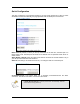




Table Of Contents
- INTRODUCTION
- GETTING STARTED
- WEB CONFIGURATION
- PC CONFIGURATION
- FACTORY RESET

LAN & DHCP Configuration
This page is for the configuration of the Router’s internal (LAN) IP Address and the properties of
the built-in DHCP Server. Take note that the built-in DHCP Server distributes IP Addresses to
both the LAN ports and the WLAN clients.
LAN Setting
LAN IP address: This is where you assign a local IP address to your router’s LAN port. The
factory default value is 10.0.0.1. It is not recommended to change the LAN address for no reason.
Subnet Mask: This is where you assign the corresponding subnet mask. The default subnet
mask is 255.255.255.0.
(Note: When you change the LAN Setting of the Router, you need to reset/renew the Local computer IP address.)
DHCP Server Setting
Enable DHCP Setting: Tick to enable the built-in DHCP (Dynamic Host Configuration Protocol)
Server. When enabled, the Router will provide IP addresses to the computers connected to the
router.
DHCP address pool selection: If this is selected, router will assign IP address automatically
from the pre-defined pool. If de-selected, you would have to define the range of the pool
manually.
DHCP address pool (For User Defined only), Start Address: This is the start address of the
DHCP pool. The router will assign this to the first computer connected to the router.
(Note: This setting will only take effect when User defined is selected under DHCP address pool selection.)
DHCP address pool (For User Defined only), End Address: This is the end address that the
router will assign to the computers connected to the router.
Page 12