
User's Manual Part 20
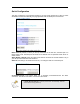





Table Of Contents
- INTRODUCTION
- GETTING STARTED
- WEB CONFIGURATION
- PC CONFIGURATION
- FACTORY RESET

Static WAN Configuration
This section lets you configure Static WAN IP settings.
WAN Static IP: Enter the static IP address.
WAN Subnet Mask: Enter the subnet mask.
WAN Gateway: Enter the WAN Gateway IP.
DNS: Enter the DNS Server IP Address.
When in DHCP client mode, these 4 columns show the IP settings obtained
from the network.
DHCP Client
This section lets you configure the WAN port as a DHCP Client. This is the Factory Default mode.
Enable DHCP Client?: Select to enable WAN as a DHCP Client.
Status: This shows the status of the WAN port, whether it has obtained a IP lease or not.
Apply and Reset
After making the necessary changes, make sure you hit Apply and Reset.
Ensure that you do this for every updated page.
Page 15