
User's Manual Part 20


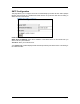


Table Of Contents
- INTRODUCTION
- GETTING STARTED
- WEB CONFIGURATION
- PC CONFIGURATION
- FACTORY RESET

SNTP Configuration
This page allows you to configure the Router to automatically synchronize its time. SNTP (Simple
Network Time Protocol) is a standard that allows devices to synchronize their time according to
SNTP Servers on the Internet.
Enable SNTP: Click to enable the SNTP feature.
SNTP Server IP Address: Enter the IP Address of the SNTP Server on the Internet that you
want to use for synchronization.
Time Zone: Enter your local time zone.
Your System Log would be displayed with real-time provided by the SNTP feature. This setting is
for Advanced Users.
Page 24