
Specifications






RIGOL
Quick Guide for DG2000
7
To Set a Waveform
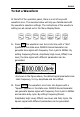
At the left of the operation panel, there is a set of keys with
waveform icon. The exercise below will help you familiarized with
the waveform selection settings. The instructions of the waveform
setting are all carried out in the Menu Display Mode.
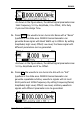
1. Press Sine, the waveform icon turns into Sine with a “Sine”
typeface in the state area. DG2000 Series Generator can
generate Sine signal with frequency from 1μHz to 40MHz. By
setting Frequency/Period, Amplitude/ High Level, Offset/ Low
level, the Sine signal with different parameters can be
generated.
As shown in the figure above, the default signal parameters are:
1kHz Frequency, 5.0 Vpp Amplitude and 0Vdc Offset.
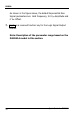
2. Press Square, the waveform icon turns into Square with a
“Square” typeface in the state area. DG2000 Series Generator
can generate Square signal with frequency from 1μHz to 40MHz
and variable duty cycle. By setting Frequency/Period,
Amplitude/ High Level, Offset/ Low level, and Duty Cycle, the
Square signal with different parameters can be generated.