
Specifications



RIGOL
Quick Guide for DG2000
13
To Trigger/Output
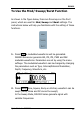
As shown in the figure below, there are two keys on the right side of
the operation panel, which are used to set Trigger and Output
Control. The instruction below will help you familiarize with these
functions.
1. Press Trigger, choose internal/external or manual Trigger
(Manual Trigger can only be used in Sweep and N-Cycle Burst)
The default setting for Trigger is “Internal”. In this mode, when
the Sweep or Burst Mode is also selected, the Generator will
continuously generate sweep or burst waveform. At this time,
press Trigger, the instrument will shift from the “Automatic”
Trigger mode into “Manual” Trigger mode.
When the generator uses the” External” Trigger Mode, if the
Sweep or the Burst Mode is selected, the signal will be
continuously generated. At this time, press Trigger, the
instrument state will not change, and it will show the
information “The instrument has already been triggered”.
Every time you press the Trigger, “Manual” Trigger will start a
sweep or generate a burst. Press the key again, and the
generator will be triggered again.
2. Press Output, activate or deactivate the output signal.
If an overload message is shown, disconnect the external
equipment from the [Output] terminal and press Output,
reactivate the output terminal.