
Specifications



RIGOL
Quick Guide for DG2000
14
To Use the Digital Input
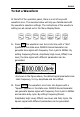
As shown in the figure below, there are two groups of keys on the
operation panel, which are the direction keys, the knob and the
keyboard. The instruction below will help you familiarize with the
Digital Input Function.
Direction Keys and the Knob Keyboard
1. Use the Direction keys to move the cursor left or right. Rotate
the knob to change a digit (clockwise to increase 1), and the
range of digit is 0~9.
2. Use the Keypad to set the parameters values of the waveforms,
which can change its value directly.