
User`s guide

RIGOL
© 2006 RIGOL Technologies, Inc
User’s Guide for DG2000 Series
3-3
Example 3: To generate a Ramp Wave
How to generate a Ramp waveform with Period of 10ms, Amplitude of 100mVpp,
Offset of 20mVdc and Symmetry of 80%.
The operation steps:
1. Set the Period.
(1) Press Ramp Freq/Period and choose Freq which will display in
reverse color.
(2) Enter “10” from the keypad and choose the unit “ms” to set the Period as
10ms.
2. Set the Amplitude.
(1) Press Ampl/ HiLev and choose Ampl which will display in reverse color.
(2) Enter “100” from the keypad and choose the unit “mVpp” to set the Amplitude
as 100mVpp.
3. Set the Offset.
(1) Press Offset /LoLev to choose Offset which will display in reverse
color.
(2) Enter “20” from the keypad and choose the unit “mVdc” to set the Offset as
20mVdc.
4. Set the Symmetry.
(1) Press Symmetry which will display in reverse color.
(2) Enter “80” from the keypad and choose the unit “%” to set the Symmetry as
80%.
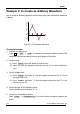
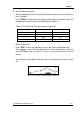
When the Frequency, Amplitude Offset and Symmetry were set, the generated
waveform is shown in figure 3-3.
Figure 3-3 The Ramp Waveform