
User`s guide

RIGOL
© 2006 RIGOL Technologies, Inc
User’s Guide for DG2000 Series
3-9
6. Edit the Waveform Points.
Edit the Voltage and Time of the points to define a waveform. Insert or delete the
point If needed.
Press Points , use the knob or the keypad to shift among the different point. The
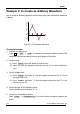
voltage and time of the points are defined below in table 3-1.
Table 3-1 The Setting of Time and Voltage of the points
Point
Time
Voltage
1
0s
0V
2
4μs
4V
3
8μs
0V
4
10μs
-2V
7. Save the Waveform.
Press Save , to store the waveform in one of the 4 Non-Volatile Memories.
Press Store , to store the finished waveform in the Volatile Memory. Only one
self-built waveform can be stored. If a new one is stored, the old one will be
erased.
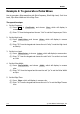
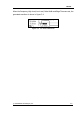
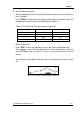
The waveform is generated by the steps above. The waveform is shown in figure
3-8.
Figure 3-8 The Self-Defined Ramp Waveform