
Specifications





20
two minutes after last pressing any button on the control panel.
Contrast- Use this function to adjust contrast of the display (0-15).
Backlight- Use this function to adjust backlight of the display (0-15).
LED Engi - Led engine options. Enter the menu if you want to set special options for LED engine.
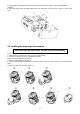
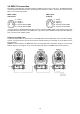
Ceil P - Ceiling projection. When this function is "On", the picture is top (bottom and left)
right reversed.
This function enables to project the image from a ceiling mounting of the MiniMe.
Rear P - Rear projection. When this function is "On", the picture is left (right) reversed.
This function enables to project the image to a rear projection screen.
GRP Engi - Graphic engine options. Enter the menu if you want to set special options for graphic engine.
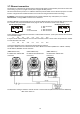
Aspect R - Keeping Aspect ratio. If this function is "On", the xture keeps native
aspect ratio of played pictures (videos).
If this function is "Off", all pictures (videos) are played in the aspect ration 16:10 regardless
of native aspect ratio of each picture (video).
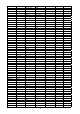
Gobo Sel Mode - Gobo selection mode. The media les assigned to the DMX values can
be sorted either in alphabetical ( item ABCD) or numerical order (item Numer).
Default assigning is the alphabetical order.
SS Gobo Swap T - Slide Show gobo swap time. The option sets time period during which
a gobo stay in a position before changing at the "Gobos presentation" function (channel 17/
Digital gobo wheel/ DMX range of 251-252).
Ref Rate - Refresh rate. Select desired refresh rate 50Hz or 60Hz.
Optics M - Optics mode. The option " Wide Optics" corrects distortion of the image if
the Lens wide-angle 1:1.5 is used.
Fans - Fan mode. Use the menu to set the xture fans to max. fan power mode ("High") or to the auto-control
mode ("Auto").
Defaults - The menu item allows to set all xture parameters to the default (factory) values.
5.4 Manual Control (Manual)
DMX Ctrl - DMX channels control. Use the menu to manually control each channel effect.
LED Engi - LED Engine options
Ext Inp - Via this menu option is possible to activate the external input (HDMI).
Keystone - The item allows to use LED engine keystoning when the external input is active.
Led On/Off - The item allows to switch off LED engine when the external input is active.
5.5 Stand-alone (St Alone)
Auto Run - Presetting playback. This function allows you to select the program which will be played in the
stand-alone mode after switching the xture on. Selected program will be played continuously in a loop.
PL DMX Prg - Play DMX program. Select this menu to run one of 9 programs which have been recorded via
the menu “Rc DMX Prg”. When the program is running, pressing the [ENTER] pauses its running.
Rc DMX Prg - Record DMX program. The menu allows you to record DMX data that receives the xture and
then replay them again via the menu “PL. DMX Prg”. There is a menu of 9 programs which can be used for
recording DMX data.
Select desired program and press the [ENTER] to start recording. To stop recording, press the [ENTER]
again.
Recorded programs ca be copied to the USB memory stick (menu "User Media") and after that loaded into
another xture (s).