
Specifications





21
5.6 Reset (Reset)
This option enables to index all effects and return them to their standard positions.
Reset GE - reset of the graphic engine module.
Reset P/T - reset of the pan/tilt module.
Reset Focu - reset of the focus module.
Reset All - reset of all xture modules.
5.7 User Media (User Media)
Custom media les can be saved in the xture memory or can be called from the external USB drive.
No USB - This item will appear if no USB ash drive is connected.
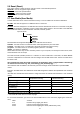
Init USB - This item will appear if an USB ash drive without desired folder structure is connected. Press [EN-
TER] to start initialization. Initilization process creates folder called ‘minime’ in the root folder of the USB ash
drive. Inside this folder are three subfolders: extmedia, intmedia, update.
Top level folder
minime
extmedia
intmedia
programs
update
Recommended and supported lesystem on the USB ash drive is FAT16
exmedia - the folder serves for media les which will be played directly from this folder.
intmedia - the folder serves for media les which will be loaded into xture memory.
programs - the folder serves for recorded programs (St Alone--> Rc DMX).
update - the folder for update le.
These folders structure may be also created by means of your computer, but exactly the same names, order
and small letters have to be kept.
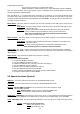
The folder exmedia (intmedia) serves for a collection of custom media les. In the folder, the Robin MiniMe
sorts les in alphabetical or numerical order and assigns them to DMX values. Max. number of media les in
the folder is 250.
We recommend to follow the 3-digit conventions for media les, where a 3-digit number is followed by
an underscore and a name e.g.: 001_mountains.jpg, 002_landscape.jpg.......
The numerical order is suitable in the case that you need to assign certain media les to specied DMX
values.
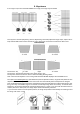
Example: The table below show differences in le DMX assignment between the alphabetical and numerical
sorting.
The table also includes le names without a 3-digit convention to illustrate their behaviour in the numerical
sorting.
Media le name DMX value
at Alphabetical Sorting
DMX value
at Numerical Sorting
001_testle1.jpg 1 1
020_testle2.jpg 2 20
19_testle3.jpg 3 19
3_testle4.jpg 4 3
460_testle5.jpg 5 Not Assigned*
testle.jpg 6 Not Assigned**
* The 3-digit number has to be in the range of 001-250.
** The media le name does not contain any digit.
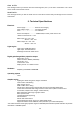
To use custom media les, you have tu set relevant DMX values on the channel 16 (Digital gobo wheel sele-
ction).
DMX Function
0-31 Default-Factory Digital gobo wheel
32-63 Internal Custom Digital gobo wheel
64-95 External Custom Digital gobo wheel (USB memory stick)