
Operating instructions


6
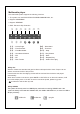
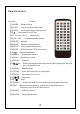
Remote control
Key name
Function
【1】MODE
……Mode selection
【2】EJECT
……Key for ejecting/inserting disc
【3】OPEN
……Key for opening and closing screen
【5】1.2.3.4.5.6.7.8.9.0 ……Numeric key
【6】VOL+ VOL - ……Increase/decrease volume
【7】MUTE ……Mute key
【8】UP DN ……Screen angle adjustment
【9】SETUP ……Enter system setting menu
【10】INFO ……DVD information, GPS shortcut key
【14】SCAN ……Scan play
【12】MENU ……System main interface
【13】RAN ……Random play switch
【16】SRCH
……Searching play
【17】ZOOM ……Under DVD mode, key for image zoom
【18】SLOW ……Slow down from 1/2 to 1/7
【23】SUB
-
T ……Subtitles selection
【21】ANGLE ……Under DVD mode, key for switching angles (supported by disc)
【24】AUDIO ……Language selection
【22】PIC ……Display screen brightness, contrast, color adjustment key, to
be used in conjunction with direction key
……Power switch “on/off” key
【4】
……Repeat single/folder
【11】
【15】 OK
……Down/right/left/up to select and confirm. When playing disc,left/right
is to control last/next
/
【19】 ……Play/pause
【20】 ……Stop