
User guide




3
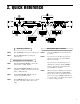
Selecting a Preset
STEP 1 Turn the PRESET control to the desired preset.
STEP 2 Press the RECALL button to call up the
selected preset.
Changing Preset Parameters
STEP 3 Turn the FUNCTION SELECT control to the
desired effect or utility function.
STEP 4 Turn the PARAMETER SELECT control to the
parameter you wish to alter under the selected
effect or utility function.
STEP 5 Use the PARAMETER ADJUST control to
select the new parameter value.
STEP 6 The COMPARE button may be used to compare
the sound of the altered value to the stored
value.
2. Quick Reference
Storing Changed Parameters
STEP 7 Press the STORE button to start the storing
procedure.
STEP 8 If you wish to save the altered preset in the
current preset location, press the STORE
button a second time.
If you wish to store the altered preset in a
different preset location, turn the PRESET
control to the desired preset number, then
press STORE a second time.
STEP 9 When storing into a different preset location,
the Chameleon will display "COPY TITLE
TOO?". If you wish to copy the title from the
previous preset, press STORE a third time. If
you do not wish to copy the title, turn any knob
to exit the storing procedure.