
User Manual
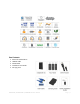


TABLE OF CONTENTS
IMPORTANT NOTICES 4
• Safety Notices ________________________________________________________ 4
• General Notices
•
Capacity Disclaimer ___________________________________________________ 4
• Care and Handling 4
GENERAL 6
• Introduction ____ ________________________________________________ 6
• Box Contents 7
• Minimum System Requirements _____________________________________ 8
• Connectors and Hawker rear view 6
MUST BE READ FIRST _________________________________________________ 9
QUICK INSTALLATION 11
• How to Connect the Interface Cables - Connecting the Drive ___________________ 11
• Cable Types: FireWire 800, FireWire 400, USB and SATA 13
INSTALLING YOUR DRIVE 15
• Hawker as a bootable device ____________________________________________ 15
• Disconnecting Your Drive 15
o PC _______________________________________________________________ 15
o Mac 16
• Reformatting Your Drive ________________________________________________ 16
o Reformatting via PC (Window based computers) 16
o Reformatting via Mac _______________________________________________ 16
• Important Note 16
•
How to Daisy-Chain through FireWire ports to your Hawker Drive at one time _____ 17
PARTITIONING AND FORMATTING THE HAWKER DRIVE ON A MAC OS 17
• Warning _____________________________________________________________ 17
• Important Notes 17
• Instructions for Partitioning and Formatting from FAT 32 to HFS+ _______________ 18
PARTITIONING & FORMATTING the HAWKER Drive on WINDOWS 2000, XP, VISTA, 7 27
• Warning _____________________________________________________________ 27
• Important Notes 27
• Different ways to get to the Control Panel __________________________________ 28
• Instructions upon reaching the Control Panel 30
ROCSTOR | ROCSECURE | HAWKER HX user manual Page | 2