
User`s manual


Chapter 2 Preparation
13
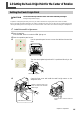
2-3 Setting the Y-axis Origin Point for the Center of Rotation
Setting the Y-axis Origin Point
CAUTION
Do not touch the tip of the live center and center drill with your fingers.
Doing so may result in injury.
To perform cutting using the rotary axis unit, you need to set the Y-axis origin point at the center of rotation.
Be sure to make this setting whenever you install or reinstall the rotary axis unit. We also recommend periodically
redoing the setting for the Y-axis origin to correct for deviation of the Y axis due to seasonal changes in temperature.
1.
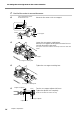
Install the small Y-origin sensor.
➊
Start the machine.
Press the VIEW button to make the VIEW light go out.
➋
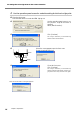
Start the operation panel screen.
➌
Use the operation-panel screen to move the table back toward the
front.
➍
Turn the chuck-tightening knob until it is positioned directly to the
side.
➎
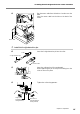
Open the front cover and install the small Y-origin sensor on the
workpiece chuck.
Install it so that the holes in the
sensor are at the front and back.
Chuck-tightening knob
Install with this orientation.
Small Y-origin
Align the sensor with the notch and
install.