
User`s manual




Chapter 4 Appendix
43
4-2 What to Do If
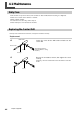
The machine doesn't run.
Is the rotary axis unit cable connected?
Connect the rotary axis unit cable securely.
The cutting results are not attractive.
Has correction of the origin point for the rotary axis
been performed?
If the origin point for the rotary axis unit is displaced, the
cutting results may show seams or differences in level, or
the shape may be irregular. Also, overall thickness may be
uneven, or uncut areas may remain. If this happens, then
redo the setting for the rotary-axis origin point.
☞ P.13"Setting the Y-axis Origin Point for the Center of Rotation"
What to Do If an Error Message Appears
[A-axis limit-switch error. Please switch off machine
power.]
An error occurred during initialization of the ma-
chine.
This message may appear if head movement is obstructed
during initialization at startup. Switch the power off, then
back on.
Redo the setting the Y origin point at the center of rotation
Setting the Y-axis origin at the center of the rotary
axis.
1. Close the front cover.
Press the VIEW button to make the VIEW light go out.
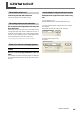
2. Use the operation panel screen to select [To Y Center].
Click [Move].
The spindle moves to the center of the rotary axis.
3. Select [Set the Y origin here].
Click [Set].