SERVER RSV-S4 USER Manual
User Manual SERVER RSV-S4 Introduction RSV-S4 can allow one SATA II 3Gbps port to communicate and connect to four (or five) SATA II 3Gbps hard drives by one eSATA single-lane cable. With Rosewill HDD controller RC-213 (Included in box) and RSV-S4, you can construct a RAID 0/1/0+1/5 data storage system to maximum your drivers size up to 2TB (500GB X4). With RSV-S4/RC-213, you can enjoy huge multimedia storage space and data protection at the same time.
User Manual SERVER RSV-S4 1.2.
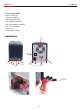
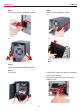
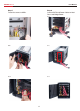
User Manual SERVER RSV-S4 Step 1 Unscrew three screws of MultiBay System. Step 2 Open the cover of MultiBay System. 2-a 2-b 2-c Step 3 Open the Front door of MultiBay System. Step 4 Install HDDs. Internal SATA cables may block the installation of the lowest hard drive. Please press down the cables as picture to avoid this issue.
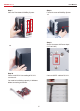
User Manual SERVER RSV-S4 Step 5 Fasten the screws to HDDs. Step 6 Connect SATA and Power Cables to Hard Drives and Bridge Board.
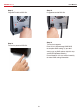
User Manual SERVER RSV-S4 Step 7 Close the Front door of MultiBay System. Step 8 Fasten the cover of MultiBay System. 8-a Step 9 Switch the correct AC Power Input (115V or 230V) 8-b Step 10 Please install RC-213 according to RC-213 user manual . You need to install driver correctly in Windows before connecting to RSV-S4.
User Manual SERVER RSV-S4 Step 11 Plug eSATA cable to RSV-S4. Step 12 Plug power cord to RSV-S4. Step 14 Turn on the computer. Enter RC-213 SiliconImage RAID BIOS to complete RAID setting. ( If you don’t want to set any RAID, please skip this step and ENTER Windows directly.) Please Read RC-213 user manual carefully for more RAID setting information. Step 13 Turn on the power of RSV-S4.
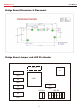
User Manual SERVER RSV-S4 Bridge Board Dimension & Placement Bridge Board Jumper and LED Pin Header P6 / P7 J1 P2 HDD P3 CHIP HDD P1 P4 HDD HDD LED JP3 P5 2 1 HDD 7 4 3 LED JP4 A B C D E H
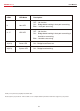
User Manual SERVER RSV-S4 LED# LED Mode Description OFFǺ No function. H Host LED ONǺ Bridge board working & host port connecting. BlinkǺ Host port accessing. OFFǺ No function. A~E HDD LED ONǺ Bridge board working & host port connecting & Hard drive connecting. BlinkǺHard drive accessing. 12(JP3) Power LED ONǺ Bridge board Power on. 34(JP3) System LED ONǺ Bridge board working. Thank you for purchasing a quality Rosewill Product. Please register your product at : www.rosewill.
www.rosewill.