
User guide

E-M-HP22-V2_13
Rotronic AG
Bassersdorf, Switzerland
Document code Unit
HygroPalm HP22-A hand-held indicator:
User Guide
Instruction Manual
Document Type
Page
8 of 16
Document title
© 2010-2012; Rotronic AG E-M-HP22-V2_13
4 Operation
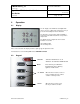
4.1 Display
The LC display of the HP22 has a backlight which
can be set to be on all the time or whenever a key is
pressed. The backlight can also be disabled.
The upper line corresponds to relative humidity or
dew / frost point and the bottom line corresponds to
temperature.
The display can be configured to show a trend
indicator on each line:
▲: increasing value
▼: decreasing value
In the event of an alarm the display shows the symbol [ ! ] to the right of the value.
For instructions see the following HW4 manual: E-M-HW4v3-F2-006.
4.2 Keypad
ON/OFF: Turns the instrument on or off
Activates / de-activates HOLD function
MENU: Press this key to activate the
internal menu. Press this key
again to exit the menu
UP / DOWN: When the menu is active, use these
keys to navigate the menu, make a
selection or change a value
ENTER: When the menu is active, press
this key to confirm a selection.