
User guide




Aries Reference Manual Section 2 – Viewing and Analysing Data
Radio Systems Information Ltd. Page 9
2.3 Selecting Data for Analysis
Aries data is displayed using maps, graphs, tables and warnings. For all of these methods it is possible to
filter the data first so that only a part of the data is displayed. The data may be filtered by date & time,
Probe, Base Site, Areas and a general value filter. The filters are selected from the relevant tab on the
configuration form.
2.3.1 Analysis profiles
It is possible to create a number of named analysis profiles which contain all of the settings for a particular
type of analysis. This makes it very easy to set up combinations of settings to analyse data in a particular
way and re-use these in the future.
Either select the name of the analysis profile from the drop-down list on the configuration form to use an
existing profile or enter a new name in the ‘save as new profile’ box.
Selecting the ‘Share this profile’ box allows other users to see and use this profile but not change it. The
profile name will appear in their list of profiles with the user name of the owner prefixed to the profile name.
Users can save the shared profile under a different name at which point they will be able to change the
configuration settings. After setting a profile to shared, other users that are logged in will need to refresh
their browser before the shared profile is visible.
Selecting the ‘Do not change Map position’ box will prevent the user’s map from changing each
2.3.2 Filter by Date
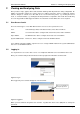
Three options are possible as shown below:
Figure 6: Filter on Date Range
In general the first two options should be used for real-time monitoring so that new data arriving at the
server is always used in the analysis and display.
The third option is used for historical analysis.
The date setting should be specified carefully so that you don’t select an excessive amount of data that will
slow down the analysis. Selecting very large amounts of data together with a fast regular update places a
heavy load on the server and can result in poor performance for all users. The Aries system will warn you
if you have selected a large amount of data with a fast update rate, or historical data with any update rate
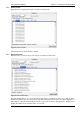
as shown in the following warnings:
Figure 7: Analysis warnings