
User's Manual

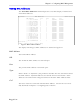

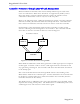
Table Of Contents
- About this User Guide
- Table Of Contents
- Chapter 1– Setting Up And Administering The Switch
- Chapter 2 - Configuring MAC Address Management
- Chapter 3 – Configuring the Ports
- Chapter 4 – Configuring VLANs
- Chapter 5 – Configuring Class of Service
- Chapter 6 – Configuring Rapid Spanning Tree
- Chapter 7 – Configuring Multicast Filtering
- Chapter 8 – Diagnostics
- Chapter 9 – Using Ethernet And RMON Statistics
- Introduction
- View Ethernet Statistics
- View Ethernet Port Statistics
- Remote Monitoring (RMON)
- RMON Historical Statistics Concepts And Issues
- RMON Alarms And Events Concepts And Issues
- The Alarm Process
- Alarm Generation And Hysteresis
- Delta vs. Absolute Values
- Configure RMON Alarms
- Configure RMON Events
- RMON Event Logs
- Troubleshooting
- Chapter 10 - Using The CLI Shell
- Chapter 11 – Upgrading Firmware And Managing Configurations
- Appendix A - Menu Tree
- Appendix B - SNMP MIB Support
- Appendix C – SNMP Trap Summary
- Appendix D – RMON Acceptable MIB Parameters
- Index

RuggedSwitch™ User Guide
Configure SNMP Management Stations
This command identifies management stations that may configure the switch
through SNMP and receive Traps from the switch.
At shipping time and after factory reloads the switch is configured not to allow
remote management or raise Traps. Identify a management station to the switch
by executing the Configure SNMP Management Stations command and
pressing CTRL-I to create a management record, as shown below.
Figure 5: SNMP Management Stations Menu
You may create up to eight management stations, each of which may have
individual settings for community strings, set access permission and sending of
traps. Note that all management stations created this way inherently allow get
access and disable set access.
My Switch SNMP Management Stations Admin Access
Community String public
Address
Set Access Disabled
Send Traps Enabled
<CTRL> Z-Help S-Shell A-Apply
Community String
The community string this management station is authenticated by.
Address
The management station IP address.
Note:
If this address does not lie in the same network as the switches IP address then the
gateway address must be configured.
Set Access
If enabled, this management station may change configuration parameters.
Send Traps
The management station will be sent SNMP traps if this setting is enabled. The
traps issued are summarized in Appendix C – SNMP Trap Summary.
RuggedCom