
User's Manual

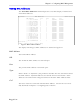

Table Of Contents
- About this User Guide
- Table Of Contents
- Chapter 1– Setting Up And Administering The Switch
- Chapter 2 - Configuring MAC Address Management
- Chapter 3 – Configuring the Ports
- Chapter 4 – Configuring VLANs
- Chapter 5 – Configuring Class of Service
- Chapter 6 – Configuring Rapid Spanning Tree
- Chapter 7 – Configuring Multicast Filtering
- Chapter 8 – Diagnostics
- Chapter 9 – Using Ethernet And RMON Statistics
- Introduction
- View Ethernet Statistics
- View Ethernet Port Statistics
- Remote Monitoring (RMON)
- RMON Historical Statistics Concepts And Issues
- RMON Alarms And Events Concepts And Issues
- The Alarm Process
- Alarm Generation And Hysteresis
- Delta vs. Absolute Values
- Configure RMON Alarms
- Configure RMON Events
- RMON Event Logs
- Troubleshooting
- Chapter 10 - Using The CLI Shell
- Chapter 11 – Upgrading Firmware And Managing Configurations
- Appendix A - Menu Tree
- Appendix B - SNMP MIB Support
- Appendix C – SNMP Trap Summary
- Appendix D – RMON Acceptable MIB Parameters
- Index

RuggedSwitch™ User Guide
Chapter 2 - Configuring MAC Address Management
Introduction
This chapter familiarizes the user with:
• Viewing learned MAC addresses
• Purging MAC Address Entries
• Configuring the switch MAC Address Aging time
• Configuring static MAC addresses
MAC Address Management Features
MAC Address management provides you with the following features:
• The ability to configure static MAC addresses.
• The ability to set the switch MAC address aging time
MAC Address Management Configuration
MAC Address Management Parameter Ranges & Default Settings
Configuration Item Default Value Supported Values
Aging Time 300 seconds 15 to 800 seconds
MAC Address Tables Management Menu
The MAC Address Tables menu is accessible from the main menu MAC Address
Tables command.
Figure 7: MAC Address Tables Menu
My Switch MAC Address Tables Admin Access
View MAC Addresses
Purge MAC Address Table
Configure MAC Address Learning Options
Configure Static MAC Address Table
<CTRL> Z-Help S-Shell>
RuggedCom