
User's Manual

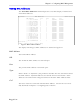

Table Of Contents
- About this User Guide
- Table Of Contents
- Chapter 1– Setting Up And Administering The Switch
- Chapter 2 - Configuring MAC Address Management
- Chapter 3 – Configuring the Ports
- Chapter 4 – Configuring VLANs
- Chapter 5 – Configuring Class of Service
- Chapter 6 – Configuring Rapid Spanning Tree
- Chapter 7 – Configuring Multicast Filtering
- Chapter 8 – Diagnostics
- Chapter 9 – Using Ethernet And RMON Statistics
- Introduction
- View Ethernet Statistics
- View Ethernet Port Statistics
- Remote Monitoring (RMON)
- RMON Historical Statistics Concepts And Issues
- RMON Alarms And Events Concepts And Issues
- The Alarm Process
- Alarm Generation And Hysteresis
- Delta vs. Absolute Values
- Configure RMON Alarms
- Configure RMON Events
- RMON Event Logs
- Troubleshooting
- Chapter 10 - Using The CLI Shell
- Chapter 11 – Upgrading Firmware And Managing Configurations
- Appendix A - Menu Tree
- Appendix B - SNMP MIB Support
- Appendix C – SNMP Trap Summary
- Appendix D – RMON Acceptable MIB Parameters
- Index

RuggedSwitch™ User Guide
Purge MAC Address Table
This command removes all dynamic entries from the MAC address table. The
only negative impact of this operation is that it causes flooding while addresses are
relearned.
Configure MAC Address Learning Options
This menu allows you to configure MAC management related parameters.
Figure 9: MAC Addresses Learning Options Menu
Aging Time
This parameter configures the time a learned MAC address is held before being
aged out.
Configure Static MAC Address Table
This menu allows you to enter static MAC addresses or MAC addresses whose
CoS priority is automatically set to High.
Figure 10: Static MAC Address Table Menu
Static MAC addresses are often configured when the user wishes to enforce port
security. The relevant MAC address (and the port it is to be restricted to) is
configured in the Static MAC addresses Table. The port is made secure by
configuration in the Port Configuration and Status menu, Configure Port
Security command.
Static MAC addresses are also configured when a device can receive but cannot
transmit frames. Static addresses are automatically displayed in the MAC
Addresses display.
Prioritized MAC addresses are configured when traffic to or from a specific device
on a LAN segment is to be assigned a higher CoS priority than other devices on
My Switch MAC Address Learning Options Admin Access
Aging Time 300 s
<CTRL> Z-Help S-Shell
My Switch Static MAC Address Table Admin Access
MAC Address VID Port CoS
00-01-E6-64-2B-B6 1 1 Normal
00-06-5B-AF-1A-AD 1 Learn High
<CTRL> Z-Help S-Shell D-PgDn U-PgUp I-Insert L-Delete
RuggedCom