
User's Manual

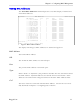

Table Of Contents
- About this User Guide
- Table Of Contents
- Chapter 1– Setting Up And Administering The Switch
- Chapter 2 - Configuring MAC Address Management
- Chapter 3 – Configuring the Ports
- Chapter 4 – Configuring VLANs
- Chapter 5 – Configuring Class of Service
- Chapter 6 – Configuring Rapid Spanning Tree
- Chapter 7 – Configuring Multicast Filtering
- Chapter 8 – Diagnostics
- Chapter 9 – Using Ethernet And RMON Statistics
- Introduction
- View Ethernet Statistics
- View Ethernet Port Statistics
- Remote Monitoring (RMON)
- RMON Historical Statistics Concepts And Issues
- RMON Alarms And Events Concepts And Issues
- The Alarm Process
- Alarm Generation And Hysteresis
- Delta vs. Absolute Values
- Configure RMON Alarms
- Configure RMON Events
- RMON Event Logs
- Troubleshooting
- Chapter 10 - Using The CLI Shell
- Chapter 11 – Upgrading Firmware And Managing Configurations
- Appendix A - Menu Tree
- Appendix B - SNMP MIB Support
- Appendix C – SNMP Trap Summary
- Appendix D – RMON Acceptable MIB Parameters
- Index

Chapter 2 - Configuring MAC Management
that LAN segment. Prioritized addresses function much as regular dynamic
addresses, appearing in the MAC Addresses display only while they are learned.
MAC Address
This parameter specifies the unicast address that is to be statically configured or
prioritized.
VID
This parameter configures the VLAN upon which the MAC address operates.
Port
If a static MAC address is being constructed, enter the port number upon which
the device with this address is located. If a prioritized address is being constructed
set this parameter to “Learn”.
CoS (Class of Service)
Set this parameter to normal if you want the prioritized address to have a normal
CoS priority or to high if you want the prioritized address to have a high CoS
priority
RuggedCom
13