
Installation manual

Runco PlasmaWall Owner’s Operating Manual 5
PRE
L
IMINAR
Y
2.1
PlasmaWall at a
Glance
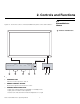
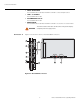
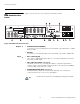
Figure 2-1 shows the locations of the PlasmaWall front-panel controls and indicators.
Controls and Indicators
Figure 2-1. PlasmaWall Front-Panel Controls and Indicators
1. POWER BUTTON
Turns the monitor’s power on and off.
2. REMOTE CONTROL SENSOR
Receives the signals from the remote control.
3. POWER/STANDBY INDICATOR
- Lights red to indicate that the PlasmaWall is in standby mode;
- Lights green to indicate normal operation;
- Flashes red to indicate that the internal temperature is too high.
2. Controls and Functions
MENU / ENTER
INPUT SELECT
DOWN UP LEFT/- RIGHT/+ /EXIT
VOLUME
4
5
6
7
1
Located on bottom
of Plasma
Located on bottom
of Plasma
3
2