
Application Guide






Caring for seniors is a difficult,
but very rewarding job. For
caregivers who assist seniors
with their household chores and
medication, it can be difficult to
know when your patient needs you
most without constantly checking in
on them, or inconveniencing them
to stand up and come find you.
Instead of asking your patient to
call you on their phone, or come
find you physically, why not try
installing a push-button doorbell in
the rooms your patient spends the
most time in?
An in-room doorbell is a great way for your patient to communicate that they need your
assistance, and allows you to spend time getting work done in other areas of the house
during the time they don’t need your assistance. To get started with this affordable and easy
to use notification system, just follow the steps below.
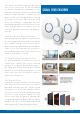
Step 1: Pick a doorbell with an adequate wireless operating range. We suggest the SadoTech
Model CX for its affordability, easy installation process, and extended wireless range.
Step 2: Pick the locations you’d like to install the push buttons. Does your patient enjoy
spending time in their bedroom? Do they spend the majority of their time in the living room
watching television?
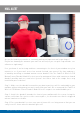
Whatever their favorite location is, simply install the push button in an easy to reach place,
such as on a wall next to the sofa, or a coffee table, so they can easily trigger the doorbell
chime when they need your help. With the SadoTech Model CX, you can set one button in the
bedroom and then set a second button in the bathroom. It is that simple.
Step 3: Set the receiver in a place that allows its sound to travel. Once you’ve placed it in a
centralized location of your patient’s home, and set the volume to a level that you can hear
while working, you’re finished!
SENIOR CARE PAGER
Model CX
This material may not be published, broadcast, rewritten, or redistributed. ©2017 SadoTech. All rights reserved.