
User's Manual

Chapter 4 Inspect the Installation
RFD01F Series Installation Manual v1.0 93
©Samsung Proprietary and Confidential
Measure the Optical Output and Connecting the Optical Connector
To measure the optical output
1 Using an optical power meter check the optical output.
2 If the optical output measurement result meets the reference value, clean the
connector again and connect it.
3 If the measurement result does not meet the reference value, discard the cable,
replace it with a new cable, and then clean the new one and connect it to the
system.
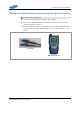
[Optical Power meter]
[LC/PC Plug]