
User's Manual

Chapter 3 Connecting Cables
RFD01F Series Installation Manual v1.0 59
©Samsung Proprietary and Confidential
Interface Cable Connection
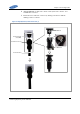
Remove/Insert Optic Module
If the optic module needs to be removed or inserted before connecting the cable,
follow the below process.
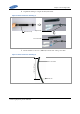
To remove Optical Module
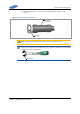
1 Hang the jig hook on the optic module’s bail within the system.
Figure 48. Optic Module Removal (1)
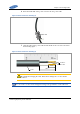
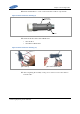
2 Completely remove the optic module from the transceiver by pulling the jig.
Figure 49. Optic Module Removal (2)
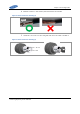
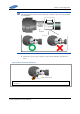
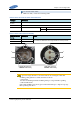
3 Remove the optic module and the jig by pressing the jig's hook grip.
Figure 50. Optic Module Removal (3)
Jig
Optic Module
Transceiver
Jig
Optic
Connector
Optic Module
[System Inside]
Jig
(Hook)
Bail
[Front View]
Location to hang the Jig