
User's Manual

Chapter 3 Connecting Cables
RFD01F Series Installation Manual v1.0 69
©Samsung Proprietary and Confidential
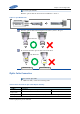
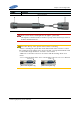
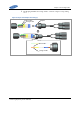
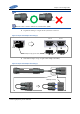
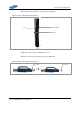
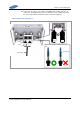
14 Fasten the shell until the white line of connector is not shown.
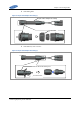
Figure 64. Optic cable connection (2)
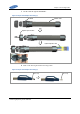
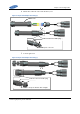
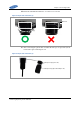
15 After connecting the optical cable, assemble the water proof caps at the system
side and the Optic Cable Adapter side.
Figure 65. Optic cable connection (3)
Waterproof Cap(System side)
Waterproof Cap(Optic Cable Adapter side)
White Line