
User Manual


Q
~
•
•
•
<
Apps
1
05
Voice recordings
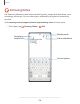
Create annotated voice recordings perfect for lectures or meetings. Take notes while
recording audio. Playback is synced to scroll to the corresponding text.
1
.
From
Samsung Notes, tap Add.
2
.
Tap
Insert > Voice recordings.
3. Use the text options to create content while audio is being recorded.
Edit notes
Make edits to notes you create.
1.
From
Samsung Notes, tap a note to view it.
2
.
Tap
Edit and make changes.
3
.
Tap
More options for the following:
• Share: Choose a file type, and share the note.
• Save as file: Choose to save the note as a Samsung Note, PDF, Microsoft
Word, Microsoft PowerPoint, image, or text file.
• Sort pages: Add, copy, cut, and delete pages.
• Page template: Apply a template to some or all pages.
• Background color: Apply a color to the page.
• Add to favorites/Remove from favorites: These notes are saved to a favorites
folder in the notes menu.
• Add tags/Edit tags: Use tags to easily search your notes.
4.
When you are finished, tap
Back.