
Instruction manual


GB-26
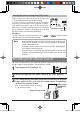
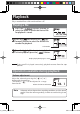
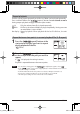
Folder skip (only if " " folder is selected)
01
02
A
D
B
03
01
Level 1 Level 2 Level 3
03
04
01
02
C
005
006
C
C
C
C
C
00
05
05
00
00
00
06
06
00
00
EE
E
E
02
If the " " folder is selected, pressing the [ ] or [ ] button in the
stop state skips folders in the "
" folder sequentially and selects the first file
in each folder.
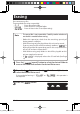
In the case of folder configuration
shown in the left figure, pressing
the [
] or [ ] button
skips in the following order.
Note
Folders that contain no file
(such as folder E in the figure)
and folders that have three or
more levels in the "
" folder
(such as folder C in the figure)
are not selected by folder
skip.
A B D
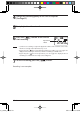
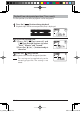
In the example of the figure above, each time folder skip is conducted, the screen
display changes as shown below.
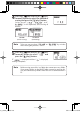
Note - Up to 500 folders in which playable files are stored can be recognized.
- If a music file is copied just under the "MUSIC" folder, the file can be played in the
folder "FOL-001".
( indicates a folder, and indicates a file.)
Total number
of folders in
the folder
Folder
number
Folder A Folder B Folder D
gap]vkjcb]cl,glbb04 .6,//,06180180/N
K