
User Manual
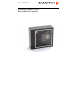
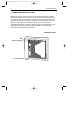
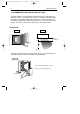

The various parts of the Pollux P-4010 are:
Sleep mode switch - When a sleep mode time-out is programmed, the -
scanner can be re-activated by pressing this switch.
The sleep-mode feature is programmable with the
menu labels from the Configuration Guide.
NOTE: The default value for the sleep mode time-out
is set to 30 minutes. When the scanner is in
sleep mode, the LED is intermittently flashing
red.
LED - A red LED indicates that the scanner is ready to read
a bar code. A green LED indicates a good read.
Good read speaker - The speaker is heard whenever data has been read cor-
rectly. The frequency and volume can be adjusted with
the menu labels from the Configuration Guide.
The Pollux P-4010 3
Pollux_UserM_Deel1.qxd 14-11-2002 09:05 Pagina 3