
User Manual

6
BlueSpin (Hotplate) Magnetic Stirrer
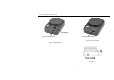
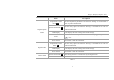
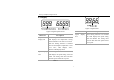
Items Descriptions
Digital hotplate
model
Temperature Control
Knob Heat
Set the temperature parameters. The function “heating” is switched ON or
OFF via push ON/OFF knob.
Speed Control Knob Stir
Set the rotary speed. The function “Stirring” is switched ON or OFF via
push ON/OFF knob.
LED Display LED displays the real working state and all settings.
Probe
When the external temperature sensor PT1000 is plugged in, probe icon
is lit.
Power Switch Switch ON or OFF the instrument.
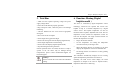
Digital model
Temperature Control
Knob Stir
Set the rotary speed. The function “Stirring” is switched ON or OFF via
push ON/OFF knob.
LED Display LED displays the real working state and all settings.
Power Switch Switch ON or OFF the instrument.
Classic model
Speed Control Knob Stir The stirring function is switched ON by rotating the knob.
Power Switch Switch ON or OFF the instrument.
Table 2