
User's Manual


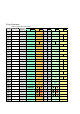



Table Of Contents

Punctuation Shift Number Shift Caps Lock Number Lock Function Lock
Key No. Single Key
Capital Letter
shift (note 1)
note 2 Shift note 3 Shift note 2 Shift note 2 Shift note 2 Shift
K29
Enter Enter Enter Enter
Page
Up
Page
Up
Enter Enter
Page
Up
Page
Up
K30
Back space Back space
Back
space
Back
space
End End
Back
space
Back
space
End End
K31
Tab Tab Tab Tab
Page
Dn
Page
Dn
Tab Tab
Page
Dn
Page
Dn
K32
Space Space Space Space Home Home Space Space Home Home
K33a
Capital Shift
K33b
Capital Shift
K34a
Punctuation Shift
K34b
Punctuation Shift
K35a
Number Shift
K35b
Number Shift
K36
Windows (Command)
K37
Escape / Escape
(note 2)
K38
Print Screen / Print Screen
(note 2)
K39
Alt (Option)
K40
Ctrl
K41
Number Lock
K42
Function Lock
K43
Pause
K44
Delete Delete Insert Insert Delete Delete Delete Delete Delete Delete
K45
Cap Lock
K46
Left Click
Mid Click
Left Click
K47
Right Click for Mouse
Note:
1. The capital shift key changes the characters in single key group to the characters in capital shift group. In
the case of caps lock indication ON, the capital shift key changes the characters in opposite direction. This
will minimize the necessity of the caps lock key operation.
2. In case of the Capital shift key down, the key codes in red colored letters are generated with shift key
depression flag set.
3. The number shift key changes the characters in single key group to the characters in number shift group.
In the case of number lock indication ON, the number shift key changes the characters in opposite
direction. This will minimize the necessity of the number lock key operation.