
User's Manual






Thanks for using SEJIN Mini-keyboard with track ball (MODEL:SPR-8695T)
THE SEJIN Mini
THE SEJIN MiniTHE SEJIN Mini
THE SEJIN Mini-
--
-keyboard with Track
keyboard with Trackkeyboard with Track
keyboard with Track-
--
-ball
ballball
ball
● Designed with the users in mind, it has a pleasant appearance and is Convenient to use.
● No extra power supply is required.
● It is compatible with the Microsoft Keyboard and Trackball
Mini
MiniMini
Mini-
--
-keyboard with Track
keyboard with Trackkeyboard with Track
keyboard with Track-
--
-ball INSTALLATION
ball INSTALLATIONball INSTALLATION
ball INSTALLATION
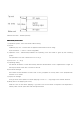
● Turn the power supply off to your computer.
● Check the keyboard and mouse PS/2 port at the back of your computer and insert
The connector at the end of the Mini key-board and mouse cables into the PS/2 port .
● Turn the power supply on to your computer.
Using the Mini
Using the MiniUsing the Mini
Using the Mini-
--
-keyboard with track ball
keyboard with track ballkeyboard with track ball
keyboard with track ball
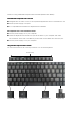
You can have access to all of the key functions of a full-sized keyboard
Function key
Function key Windows key Application key Cursor key