
Navigation Scheduling Guide

APP NAVIGATION
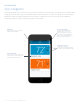
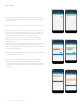
Temperature control
Check your current set
temperature and quickly adjust
it using the up and down arrows.
Add device
Tap the plus (+) sign to add an
additional thermostat.
App navigation
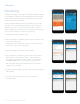
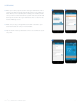
The Sensi app allows you to remotely control your thermostat when your thermostat is connected to a Wi-Fi network. After
installing your Sensi thermostat, your app dashboard will look like what you see below. You can edit account information,
add another thermostat and quickly adjust the temperature on any thermostat on your account. To edit individual
thermostat settings or features, simply select that thermostat name.
Account information
Edit your email address and
password, opt in or out of
thermostat alerts, access our
help center, leave feedback or
log out. (On an Android device
there are 3 vertical dots.)
Thermostat name
Tap your thermostat name to go
into the main control screen for
that individual thermostat.
Sensi
TM
App | NAVIGATION & SCHEDULING GUIDE 3