
Navigation Scheduling Guide



14
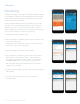
12. When you’re done, tap the arrow in the upper left hand corner to
return to the day groupings and edit any other group of days you
have. When you’re completely done editing your schedule, make
sure you have it selected under the system mode drop down and
then tap the arrow in the upper left hand corner to return to the
main Scheduling screen.
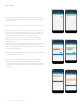
13. Make sure you’ve got “Programmed schedule” selected so your
Sensi thermostat can run your new schedule.
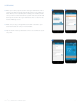
14. Tap the arrow in the top left hand corner to see a timeline of your
set points.
12 13
SCHEDULING
Sensi
TM
App | NAVIGATION & SCHEDULING GUIDE 6