
Data Sheet


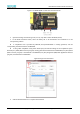


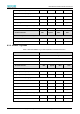
Table Of Contents
- Abstract
- 1. Introduction
- 2. Characteristics
- 3. Pin Definition
- 4. System memory Space
- 5. ATE(RF Test Mode)
- 5.1. Wi-Fi ATE Command
- 5.1.1. Start MP mode
- 5.1.2. Stop MP mode
- 5.1.3. Set Tx rate
- 5.1.4. Set operational channel
- 5.1.5. Set operational bandwidth
- 5.1.6. Set Tx power
- 5.1.7. Set antenna for Tx
- 5.1.8. Set antenna for Rx
- 5.1.9. Start air Rx mode
- 5.1.10. Start continuous Tx mode
- 5.1.11. Query air Rx statistics
- 5.1.12. Reset air Tx/Rx statistics
- 5.2. Bluetooth ATE Command(TBD)
- 5.3. Example Command
- 5.1. Wi-Fi ATE Command
- 6. Flash Programming
- 7. Electrical Parameters
- 8. RF Parameter
- 9. Antenna Information
- 10. Dimensions and Production Guidance
- 11. Production Guidelines
- 12. FCC and IC Information
- 12.1. FCC Warning
- 12.2. IC warning
- 12.3. Trace antenna designs
- 12.4. RF exposure considerations
- 12.5. Antennas
- 12.6. Label and compliance information
- 12.7. Information on test modes and additional testing requirements5
- 12.8. Additional testing, Part 15 Subpart B disclaimer
- 12.9. The module is limited to OEM installation ONLY.
- 12.10. The OEM integrator is responsible for ensuring that the end-user has no manual instructions to remove or install module.
- 12.11. The module is limited to installation in mobile or fixed applications
- 13. Packaging and Label Information
- 14. Sales and Technical Support Information

EMC3380 Series Wireless Module Data Manual
Copyright of Shanghai MXCHIP Information Technology Co., Ltd.
30
Figure 7 Use MXKIT-BASE to enter serial download mode
2. Open the burning software image tool (v2.2.12), Chip Select selects AmebaD (8721D).
3. In the Flash Download section, select the binary file to be downloaded and download it to the
corresponding address.
⚫ If compilation tool is provided by MXCHIP, xxxx@emc338x.all.bin is usually generated, and the
corresponding download address is 0x08000000.
⚫ If using other compilation tools, please should query the relevant settings of the compilation system.
The km0_boot_all.bin (KM0 core boot program) usually generated is downloaded to 0x08000000, km4_boot_all.bin
(KM0 core boot program) is downloaded to 0x08004000, km0_km4_image2.bin (KM0, KM4 application firmware
program) is downloaded to 0x08006000.
Figure 8 Image Tool use interface
4. Click the Download button to complete the download