
Technical data




52 Commissioning WAGO-I/O-SYSTEM 750
750-652 Serial Interface RS-232 / RS-485
Manual
Version 1.3.0
With the [Default] button, you select the default setting for this I/O module. With
the [Apply] button, you then transfer the parameters to the non-volatile memory
of the I/O module.
With the [Close] button, you close the configuration dialog without transferring
any changed parameters to the non-volatile memory of the I/O module.
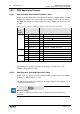
8.1.4 Parameter Range
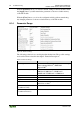
Figure 20: Parameter Range
The following selection boxes are displayed in tabular form. The possible settings
are described in more detail in the chapter “Function Description”.
Table 24: Parameter Range
Selection box
Possible settings
Operating Mode
RS-232 / RS-485 half-duplex
*
/ RS-422 full-duplex
/ data exchange RS-422
4)
/ DMX half-
duplex/250k
4)
Transmission Rate [Baud]
300 baud / 600 baud / 1200 baud / 2400 baud /
4800 baud / 9600 baud
*
/ 19200 baud /
38400 baud / 57600 baud / 115200 baud
Data Bits
8
*
/ 7
Parity
none
*
/ odd / even
Stop bits
1
*
/ 2
Flow Control
disabled
*
/ XON/XOFF
1)
/ RTS/CTS
2)
/ RTS, lead
and follow-on time
4)
Continuous Send Mode
(Continuous Send)
disabled
*
/ release
Continuous Receive Mode
(Continuous Receive)
disabled
*
/ release