
Technical data




54 Commissioning WAGO-I/O-SYSTEM 750
750-652 Serial Interface RS-232 / RS-485
Manual
Version 1.3.0
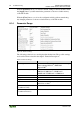
To change settings in the serial I/O module, adjust the values in the configuration
area.
Changed settings are marked with a change symbol (pen symbol) in order to
indicate that these values no longer match the values originally queried by the
module.
To transfer the new values to the I/O module, click the [Write] button.
You can also put the I/O module into another operating mode. Here the changed
configuration is saved and the inputs and outputs of the I/O module are switched
immediately according to the operating mode.
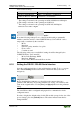
Input operating mode!
In case of a change of operating mode, a warning appears that points out that it
may be necessary to change the wiring.
8.2 Configuration and Parameterization via GSD for
PROFIBUS DP and PROFINET IO
Other methods are available for configuration depending on the fieldbus
coupler/controller. These are described in the appendix.
8.3 Data Transfer
The following chapters describe data transfer in all operating modes for serial
transmission and in the Data Exchange operating mode.
8.3.1 Example of Operating Modes for Serial Transmission
The control of the transmission and receipt operation is handled with the control
and status byte. Requests are indicated by the change (toggle) of a bit. The
successful processing is indicated by an assigned bit. It takes the value of the
request bit.
Initialize I/O module:
• Setting of IR in control byte C0
• Initialization of the I/O module
• Blocking of the transmit and receive functions
• Deletion of the transmit and receive memory
• Loading of the configuration data in the serial I/O module