
Technical data




60 Commissioning WAGO-I/O-SYSTEM 750
750-652 Serial Interface RS-232 / RS-485
Manual
Version 1.3.0
8.3.6 DMX Application Example
8.3.6.1 Operation with Deactivated Continuous Send
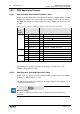
In this mode, the I/O module only transmits the data for a limited number of DMX
channels according to the set size of the process image (see table “Process data in
the DMX operating mode without continuous send”). Higher refresh rates are then
possible.
Table 39: Process Data in the DMX Operating Mode Without Transfer Optimization
Process
image
length
Input data
Output data
8 bytes
S0
Status byte 0
C0
Control byte 0
S1
Status byte 1
C1
Control byte 1
D0
Data byte 0
*)
D0
Data byte 0
DMX start byte (always 0)
D1
Data byte 1
*)
D1
Data byte 1 (DMX channel 1)
D2
Data byte 2
*)
D2
Data byte 2 (DMX channel 2)
…
…
D5
Data byte 5
*)
D5
Data byte 5 (DMX channel 5)
24 bytes
D6
Data byte 6
*)
D6
Data byte 6 (DMX channel 6)
…
…
D21
Data byte 21
*)
D21
Data byte 21 (DMX channel 21)
48 bytes
D22
Data byte 22
*)
D22
Data byte 22 (DMX channel 22)
…
…
D45
Data byte 45
*)
D45
Data byte 45 (DMX channel 45)
*)
Not in use. In this mode, no data is received.
The transmission method is described in the chapter “Transmission of the
Character String 'Hello World!'”
8.3.6.2 Operation with Activated Continuous Send
In this mode, the output buffer filled with the DMX start byte (always 0) and then
with data for DMX channel 1 to 254.
The transmission method is described in the chapter “Function Description > … >
“Continuous Transmission”.
Observe settings!
To ensure continuous transmission, the “Continuous Send” setting must be
activated!