
Troubleshooting guide

–
10
–
EN
SETTING UP YOUR DVD PLAYER
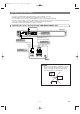
AUDIO OUT
DIGITAL AUDIO OUT
COAXIALOPTICAL
LY
VIDEO
OUT
C
B / PB S-VIDEO
OUT
C
R / PR
COMPONENT
VIDEO OUT
R
ANALOG INPUT
R
L
DVD Player
AUDIO cable
(supplied)
Amplifier of stereo system, etc.
(Red)
(White)
(Red)
(White)
Jack and Plug Colours
To amplifier
audio input jacks
Audio Left: White
Audio Right: Red
To AUDIO
OUT jacks
4
Connecting the Player to audio equipment provides normal stereo sound, plus powerful stereo sound enhanced by Dolby
Digital 5.1 channel surround sound, DTS and MPEG Audio.
Connecting to Audio Equipment
CC
Analogue audio connection
Playing 2 channel audio
AUDIO OUT
DIGITAL AUDIO OUT
COAXIALOPTICAL
LY
VIDEO
OUT
C
B / PB S-VIDEO
OUT
C
R / PR
COMPONENT
VIDEO OUT
R
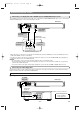
DVD Player
TV (with external input jacks)
RL
AUDIO
IN
S-VIDEO
INPUT
VIDEO
IN
V
IDEO/AUDIO cable
(supplied)
S-VIDEO cable
(commercially available)
To VIDEO/AUDIO
OUT jacks
To S-VIDEO
OUT jack
(White)
(Yellow)
(Red)
(White)
To VIDEO/AUDIO
input jacks
To S-VIDEO
input jack
(Red)
(Yellow)
4
• When the Player is connected to a TV using both a VIDEO cable and an S-VIDEO cable, only the S-VIDEO connection is
enabled (the VIDEO connection is disabled).
• You will not be able to hear all of the sound being output by the Player if you use the VIDEO/AUDIO cable (supplied) to a
monaural TV that has only one AUDIO input jack.
NOTES:
• Be sure that the colours of the jacks and plugs match up when connecting the cable.
• Connect the Player directly to the TV. If you attempt to view video on a TV connected via a VCR, the copy protection
function will scramble the picture.
• If you want to listen to the audio through audio equipment, connect only the S-VIDEO or VIDEO cable to the TV.
Connecting a TV Equipped with S-VIDEO Input or VIDEO/AUDIO Input Jacks
The S-VIDEO connection provides a better quality video signal than the VIDEO (COMPOSITE) output. Use a commercially
available S-VIDEO cable to connect from the Player to the TV.
E5946AD.qx3 04.4.12 5:36 PM Page 10