
Instruction manual



102
Ingredient stock
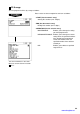
You can assign a stock quantity to each ingredient.
Shown below is an example of selecting “2 ADD.”
Program each item as follows:
• CURRENT STOCK
The current stock is displayed.
• ADD VALUE (Use the numeric entry)
Enter a value to be added (max. 7 digits: 1 thru 9999.999).
NOTE
•
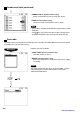
If you need of overwrite or subtract a stock quantity to or from
the current stock quantity, select “1 OVER WRITE” or “3 SUB”
and enter a value to be overwritten or subtracted.
•
You cannot enter any values for the item marked with “x.”
Selected ingredient
table no.
(ENTER)
www.cashregisters.net