
Instruction manual




159
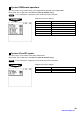
Z1 reports
You can assign a secret code to each report.
Secret code: max. 4 digits (0001 to 9999/0000) (Use the numeric entry)
NOTE
If “0” is entered, the “compulsory secret code entry” will be canceled.
Program each item as follows:
DEPARTMENT Department report
PLU PLU report
PLU BY DEPT PLU by department report
PLU HOURLY GROUP PLU hourly group report
TRANSACTION Transaction report
ALL SERVER All server report
IND. SERVER Individual server report
ALL MANAGER All manager report
IND. MANAGER Individual manager report
HOURLY Hourly report
GLU GLU report
GLU BY SERVER GLU by server report
CLOSED GLU Closed GLU report
CL-GLU BY SERVER Closed GLU by server report
DRIVE THRU Drive-through report
D-THRU BY SERVER Drive-through by server report
CLOSED D-THRU Closed drive-through report
CL-DT BY SERVER Closed drive-through by server report
SERVICE TIME Service time report
STACKED REPORT Stacked report
EJ REPORT Electronic journal report
PGM2-mode operations
You can assign a secret code to each programming operation in the PGM2 mode.
Secret code: max. 4 digits (0001 to 9999/0000) (Use the numeric entry)
NOTE
If “0” is entered, the “compulsory secret code entry” will be canceled.
Program each item as follows:
ARTICLE Article programming
DIRECT KEY Direct key programming
PLU MENU KEY PLU menu key programming
FUNCTION Function programming
MEDIA Media programming
TEXT Text programming
PERSONNEL Personnel programming
TERMINAL Terminal programming
DATE/TIME Date/time programming
OPTIONAL Optional programming
SECRET CODE Secret code programming
REPORT Report programming
LOGO TEXT Logo programming
PRINTER Printer programming
GLU CODE GLU code programming
TAX Tax programming
TRAINING Training mode
DATA SEND Data send
DATA RECEIVE Data receive
The screen continues.
The screen continues.
www.cashregisters.net