
Technical data



Configuration M203
4
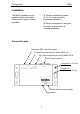
Setup key
Using the Setup key, you call up
the M203 menu, which is shown
in the M51 display.
If the M203 interface is connected
with an M219 Additional room
amplifier, the M51 display is also
used.
In the case of an M10 installation,
display is done using the M230
service program or M-Scope.
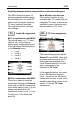
Using the Softkeys
you can get to pages #1 and #2
Setup page #2 only appears if a
video device has been selected
on page #1 as Serial Port Mode.
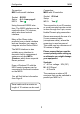
Setup #1 @ M51
Function: Addr. assignment
Display: Slot Address
Connection: M51-Link
M219: Yes ;
M51 operation (fig. page 9+10)
A different address must be
assigned through the slot
address, if a second M203
(M200) is connected to the M51
Link output, so that both don’t
occupy the same slot address.
This would cause errors. In the
case of a double address assign-
ment, neither of the two M203s
(M200s) would be shown in the
Version list.
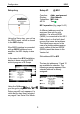
Slot address: #11 or #12
The two slot addresses 11 and 12
are available for selection. The
following message appears if the
selected address is already
assigned: