
Technical data
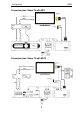
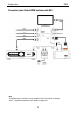
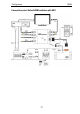


Configuration M203
13
Sharp TV
Activating the RS232 interface at the Sharp TV
Following the initial commissioning of a Sharp television, its serial
interface (RS232) is not yet configured for control by an external
device. The RS232 interface is only permanently activated once a
one-off initialisation command is sent through the M203 interface to
the Sharp television. Activation is done with the following steps:
1) Carry out a complete reset (see Page 8)
2) Make the settings as described in "Setup #2 – AV
Assignment", from Page 14.
3) Switch on the M51/M219 with FM Tuner. If no FM Tuner is
installed, select a source that is not linked to a television video
input in Setup #2.
4) Switch on the Sharp television with the original remote control,
using the Power button.
5) Wait until the television is ready to receive.
6) Now select a source at the M51 (or at the M219 Side room
amplifier), which is linked to a television video input in Setup
#2.
7) The television is now initialised and retains the facility to be
controlled through the serial interface, even when it is
switched off.
Please note:
If the television is changed, the process described above has to
be repeated.
Special characteristic on Input 3
The Input 3 can only be addressed by the M203 if there is already a
signal at its input. If this is not the case, the television recognises this
and ignores the control command.