
Technical data
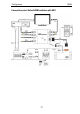



Configuration M203
16
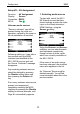
Setup #2 – AV Assignment
2. Assigning video inputs
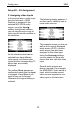
In the second step, a video input
from the television / HDMI
Switcher is assigned to the
selected M51/ M219 audio
source, using the Input ±
softkey. Using these softkeys,
you can step through a loop of
video inputs that are available to
the television.
As the televisions that can be
selected from have different
video inputs, only those video
inputs that the corresponding TV
device has, are actually
displayed.
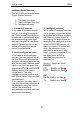
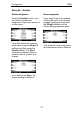
The softkey Store appears as
confirmation each time the Input
is changed. Press Store if you
want to save your changes.
Otherwise the original setting is
retained.
The following display appears, if
a video input is called by one or
more audio sources:
Assignment example
This example shows you that, as
well as the currently displayed
audio source (DVD), a further
audio source has also been
assigned to this video input.
Using the Source ± softkeys,
you can search for the audio
source that also calls this video
input.
Several audio sources are
always required if, for example,
the M300/M301 Video switch is
used, which bundles several
video sources together to one
video input on the television.