
Product Info
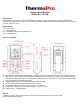



Table Of Contents
- Congratulations on your purchase of the Professional Remote Cooking Thermometer, a programmable radio frequency food thermometer. You will now be able to remotely monitor the time and temperature of food cooking on your grill, smoker or oven.
- Buttons
- Buttons
- Measure meat temperature to USDA doneness temperature range
- 1. Press MODE to select thermometer mode. The upper display will show a small MEAT and a meat type such as BEEF.
- 4. Once the temperature of meat reaches the preset doneness level, the receiver will beep and the LCD backlight will turn red.
- Measure meat temperature set to your specific taste
- Procedure for typical use on an outdoor grill
- The following typical example will go through the steps to have the Professional Remote Cooking Thermometer alert you to when a beef steak is cooked to medium (USDA doneness level) and remind you to rotate hot dogs in 5 minutes.
- 1. Turn on the grill.
- 2. Follow the synchronization/pairing procedure.
- 3. Place steak and hot dogs on grill rack.
- 4. Insert probe sensor into the center of thickest portion of the steak. Avoid touching bone or heavy fat areas. Assume the meat temperature is 45 (F.
- HELPFUL HINTS
- HELPFUL HINTS
- Always wear a heat resistant glove to touch the stainless steel probe sensor or wire during or just after cooking. Do not touch with bare hands.
- Cleaning
- Always wear heat resistant glove to touch the stainless steel probe sensor or wire during or just after cooking. Do not touch with bare hands.
- Keep the stainless steel probe sensor and wire away from children.
Should any repairs or servicing under this warranty be required, contact Customer Service by phone or email for
instructions on how to pack and ship the product to ThermoPro.
This warranty gives you specific legal rights and you may also have other rights which vary from state to state.
CUSTOMER SERVICE
Telephone: 1-877-515-7797 (USA & CANADA only)
Email: service@buythermopro.com
Hours: Weekdays 9:00 AM- 6:00 PM EST
FCC Statement
This device complies with part 15 of the FCC rules. Operation is subject to the following two conditions: (1) this device
may not cause harmful interference, and (2)
this device must accept any interference received, including interference that may cause undesired operation.
Changes or modifications not expressly approved by the party responsible for compliance could void the user's authority to
operate the equipment.
NOTE: This equipment has been tested and found to comply with the limits for a Class B digital device, pursuant to part 15
of the FCC Rules. These limits are
designed to provide reasonable protection against harmful interference in a residential installation. This equipment
generates uses and can radiate radio frequency
energy and, if not installed and used in accordance with the instructions, may cause harmful interference to radio
communications. However, there is no guarantee
that interference will not occur in a particular installation. If this equipment does cause harmful interference to radio or
television reception, which can be
determined by turning the equipment off and on, the user is encouraged to try to correct the interference by one or more of
the following measures:
• Reorient or relocate the receiving antenna.
• Increase the separation between the equipment and receiver.
• Connect the equipment into an outlet on a circuit different from that to which the receiver is connected.
• Consult the dealer or an experienced radio/TV technician for help.
The device has been evaluated to meet general RF exposure requirement. The device can be used in portable exposure
condition without restriction.