
User's Manual
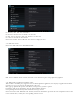
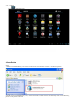

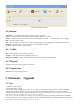
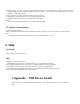
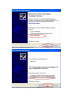

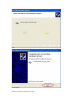
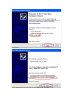
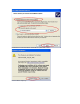
4 During upgrade, you will be asked to install the USB Driver twice. The driver file is “usbdrv.inf” in the folder
“usbD river”,which is located at the installation path of “LiveSuit”( for more detail information please refer the to
“Appendix:USB Device Insta ll”)
5 If you upgrade successfully, please pull out the device, then reset it.
6 if failed, please pull out the device, reset it. And do the upgrade again.
7 if upgrade failed so ma ny times, please contact with the franchiser.
Notes:
Please do not click the “ NetSync” or “ exit” button during upgrade.
5.2. Internet Synchronization
1 open the LiveSuit software
2 click “ Internet Synchronization” bu tton to start the LiveSuit for upgrad e. ( Notes: users must can visit the internet)
Notes:
During internet synchronization, please do not click “system upgrading” or “exit ”.
6. Help
User G uide
1 click “ Help” to open the help file.
FAQ
1. warning: “ cann’t find the device”,
The problem maybe th at device is not inserted to PC, or you should wait for a w hile.
2. You’d better backup the data in your device to a reliable memory device before up gra de.
3. The upgrade process may des troy the data in your device, please backup them first.
4. You should obtain our firmware from official web of the manufacturer rather than lawless webs.
5. Please contact with the distributor for other problems.
7.Appendix
:
USB Device Install
If your PC has never been insta lled such USB Device, you need to do this. Please see the following
steps: