
User's Manual

2、First usage
2.1 battery manag ement and charge
When you use the machine for the first time ,please secure that the battery is full-ch arged:
Insert the cha r ge or adapter to the USB interface.
The first and second time must hold on 2 hours,later you can hold
On for about 4 hour s.
【
Note
】:
Standard charge(input: AC 110~240V 50/60Hz Max
:
180MA output: DC5.0~5.5V/1.5A)needed,no
DC charge offered,by USB interface to charge .
During the charge,the battery icon is running.
When charge end,the battery icon will be gr een and stop running.
In or der to ext end lifetime,it is suggest ed tha t recharge when low battery ;
【Note】:1、If no usage for a long time,please recharge within a month to avoid damage to the machine
resulted from the exhaustion of battery.
2
、
After Power off,insert the charge,if the machine sh owes low battery
、
charging,a short time
needed bef ore the battery can support the machine to start up.
3
、
If the machine need to be charged in a standard time , it must be in sleep mode.
2.2 Connect PC
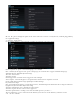
Connect the PC and this machine by USB cable,then the machine shows USB has been connecting,choose
loading to transfer data,if not ,it is charging.
Enter the loading M odel ,you can send、delete the file in the player or the storag e card.
3.Operation Model
3.1 Main Model description
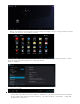
The model after turn on the machin e: