
User's Manual


10
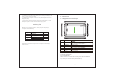
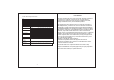
1.3 Technical specifications
Size
Weight
LCD Display
PC Interface
OS
Hard Drive Capacity
System Memory
Capacity Expansion
Music Function
Video Function
Photo browse
WIFI
Camera Function
Working
temperature
Languages
Mp3, WMA, OGG, AAC, 3GP, WAV etc.
20Hz-20KHz
Mp4, MKV, RMVB, AVI etc.
1920 *1080
16:9
802.11b/g/n
Max 54Mbps
2.4GHz
Recording Function
Support
7.0 inch 800*480- Multi-point capacitive touch screen
High speed Micro USB
Android 4.4
8GB
512MB DDR3
Support T-Flash card 32GB(max)
Format
Max. Resolutions
Format
Max. Resolutions
Screen Ratio
JPG/BMP/JPEG/ etc .
Support
Transmission rate
Work Frequency
Front 0.3 megapixel camera
Support
-20-60ȭ
Simplified Chinese/Traditional Chinese/English/ French/
German/Spanish.
Rear 0 3 megapixel camera
.
FCC Statement
This device complies with part 15 of the FCC Rules. Operation is subject to
the following two conditions: (1) this device may not cause harmful
interference, and (2)this device must accept any interference received,
including interference that may cause undesired operation.
This equipment has been tested and found to comply with the limits for a
Class B digital device, pursuant to Part 15 of the FCC Rules. These limits
are designed to provide reasonable protection against harmful interference
in a residential installation.This equipment generates, uses and can radiate
radio frequency energy and, if not installed and used in accordance with the
instructions, may cause harmful interference to radio communications.
However, there is no guarantee that interference will not occur in a particular
installation. If this equipment does cause harmful interference to radio or
television reception,which can be determined by turning the equipment off
and on, the user is encouraged to try to correct the interference by one or
more of the following measures:
-- Reorient or relocate the receiving antenna.
-- Increase the separation between the equipment and receiver.
-- Connect the equipment into an outlet on a circuit different from that to
which the receiver is connected.
-- Consult the dealer or an experienced radio/TV technician for help.
Changes or Modifications not expressly approved by the party responsible
could void the user’s authority to operate this device.